What is OpenVPN GUI?
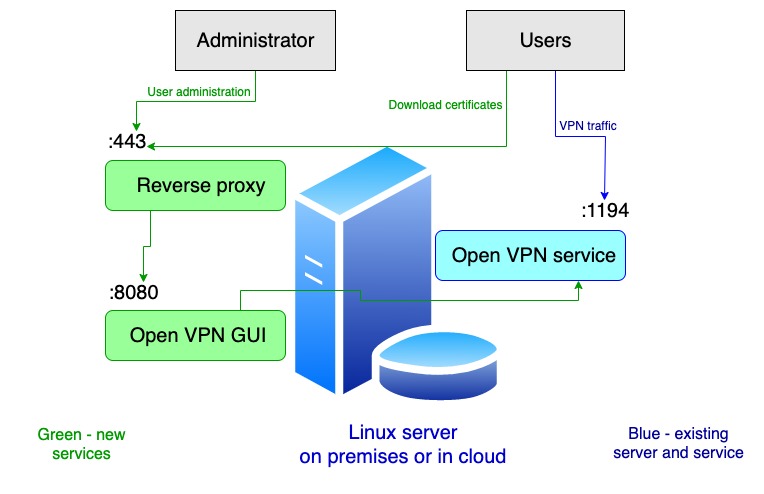
OpenVPN GUI is browser based graphical user interface to access your existing OpenVPN service. You use your own existing OpenVPN server and install only one package that we provide on a same server. We do not make difference if server is on premise or in cloud. We do not maintain your OpenVPN server, we only provide GUI for that existing service. OpenVPN GUI will give an administrator easy way to administer user's accounts. Also, it will give users ability to easily download their own openvpn config file and set up clients in a couple of clicks.
Available plans
Free
Starter
Medior
Profesional
Business
Enterprise
Installation steps
- On existing Linux server (where openvpn server lives) install OpenVPN GUI package provided by us. Our service is simple web application that listens on 8080 port non-ssl. Make sure service is starting on boot.
- Set up application environment/config file with api keys that you created on our platform https://vpn.it-outsource.me. Even if you use free plan, you have to create and pick up API keys on our portal and set it up within application configuration.
- (optional) create DNS record that points to OpenVPNGUI app, like openvpn.your_domain.com. If OpenVPN GUI service is hosted on OpenVPN server you can use same DNS record as for OpenVPN (recommended).
- Provide SSL termination for https://openvpn.your_domain.com via reverse proxy of your choise. You have to obtain SSL certificate (paid or letsencrypt). We provided configuration template files for haproxy and nginx. Technically, reverse proxy does not have to live on same server where OpenVPN is living. But in this case we strongly advice that reverse proxy server is deployed on the same private subnet with OpenVPN server because traffic between them will be unencrypted.
- Open firewall for port 8080 so traffic can reach our application from point of SSL termination (previous step).
-
Start openvpngui service.
systemctl enable openvpngui systemctl start openvpngui systemctl status openvpnguiIf you can open in browser https://openvpn.your_domain.com from public network you did all well.
- Note: oldest available (non-revoked) user / certificate in OpenVPN server is administrator. You can't change administrator, it has to be the oldest user, which in the most cases is the person who deployed OpenVPN service.